 ITBLogs.Info
Vibe Coding a NoSQL Server: Testing the Limits of the Rapha Loop
I used Vibe code to build a NoSQL server. There are two reasons: I need a NoSQL database to store pricing information. Second one, I wish to try how good I am with vibe coding and raphla loop.
Vibe coding is very high risk. There is a high chance of bugs, even though there may be security holes. Thus, I chose to build a NoSQL Server in my pricing comparison project. That is an open-source project. No commercial usage. Moreover, it will store pricing information, which is publicly available, with no security risks.
At the end, I have this AdvGenNoSqlServer Project.
Exploring Ralph Driven Development
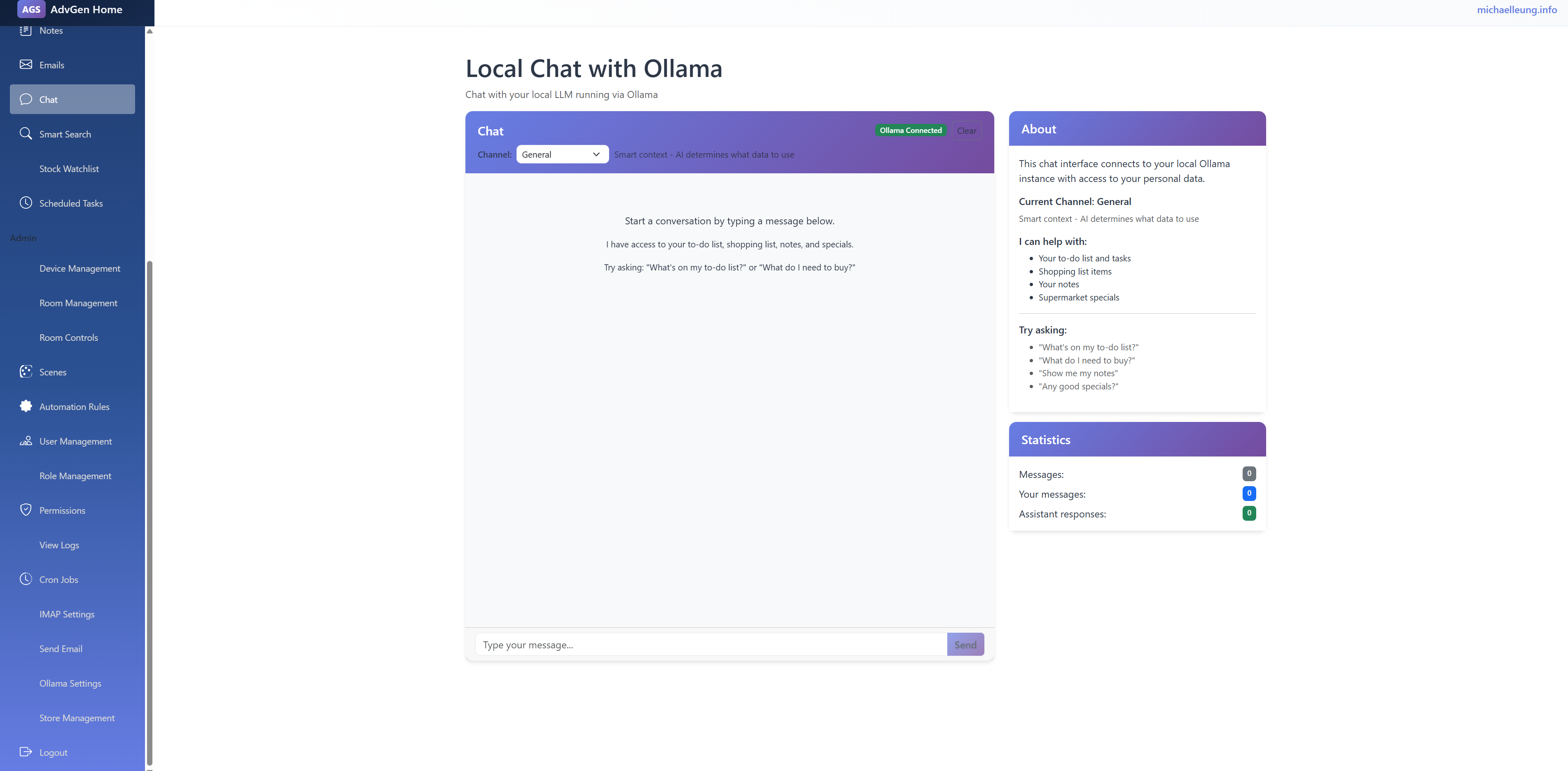
After I read the article from Stop Chatting with AI. Start Loops (Ralph Driven Development) from Luke Parker. I have tried the Ralph Driven Development. That is mind-changing. In the past, I have used AI coding before, which is more like programming by chatting. But Ralph Driven Development is to loop the specification, executing the plan item by item. Then the AI agent will build the application without any human interaction. What I need to do is write the plan in very detailed steps, like “Creating User Management Page with CRUD functions, the edit window needs to be a modal window”. I need to write in very detail, like to teach 3 years old child. At the end, I built my home intranet. It has a to-do list and shopping list management. Moreover, I have hooked up with ollama. I can use the chat to access my to-do and shopping items. Of course, it has a full of bugs. I still need to test and debug (although in the plan, I told it to test it).
Luke used OpenCode. For myself, I used kimi, that is relatively lower cost than Claude Code.
My command is
while ($true) { kimi -p "READ all of plan.md Pick ONE task per timesso Verify via web/code search. Complete task, verify via CLI/Test output. Commit change. ONLY do one task. Update plan.md. If you learn a critical operational detail (e.g. how to build), update AGENTS.md. If all tasks done, sleep 5s and exit. NEVER GIT PUSH. ONLY COMMIT." --yes }
That is working well, but it burned the quote very quick
Why I Quit Optus After 20 Years: I lost my faith in them.
For two decades, my home internet was something I barely thought about. I was an Optus "lifer." I stayed through the price hikes and the contract changes because I believed the "Big Brand" myth: if you pay more for a premium name, you get premium reliability.
But as a 100% remote worker, my internet isn't just a way to watch Netflix; it’s my office, my commute, and my livelihood. Over the last couple of years, that 20-year relationship didn't just bend—it snapped.
If you’re working from home and still clinging to a legacy provider out of habit, here is why I finally made the switch to Aussie Broadband.
1. The Death of the "Reliability" Myth
The logic was simple: Optus is huge, so they must have the best backup plans. The reality? A massive nationwide outage in 2023, followed by significant state-wide issues in 2025.
When you work remotely, an outage isn't just an inconvenience; it’s a professional disaster. Disappearing from a client meeting or being unable to access cloud servers for a full day is a risk I can no longer afford. I realized that paying a premium price wasn't actually buying me a safety net.
2. The Support Gap: Offshore vs. Local
This was the clincher for me. When things go wrong—and in tech, they eventually do—the recovery process matters.
The Optus Experience: Navigating clunky AI chatbots and eventually being routed to an offshore call center. Trying to explain complex NBN sync issues to someone reading from a script thousands of miles away is exhausting.
The Aussie Broadband Experience: They use 100% Australian-based staff. When I call, I speak to someone who understands the local infrastructure and the urgency of my workday. For a remote professional, talking to a local expert who can "kick" your connection or run a line test instantly is worth its weight in gold.
3. The "More for Less" Paradox
I expected that moving to a highly-rated provider like Aussie Broadband might cost me more. I was wrong. By leaving the "Big Brand" legacy behind, I achieved a total "win-win":
Price: I am saving $30 every single month. That’s $360 a year back in my pocket.
Speed: My download speeds jumped from 250 Mbps to 500 Mbps.
I am literally paying less money for double the speed. As someone who constantly handles large file transfers and back-to-back video calls, the performance boost is life-changing.
ChatGPT is getting less market share.
About a year ago, ChatGPT became the market standard for generative AI, which sounds like one choice. Even a lot of times, we said, “Ask ChatGPT,” “ChatGPT it.” However, after a year, the AI landscape has changed significantly. There are some rivals from China, such as Deepseek and Qwen. Gemini and Grok are attracting more users. Personally, I used Gemini a lot; their free version got better image generation results than ChatGPT. Moreover, Germini provided more free quotes. In the past, I used ChatGPT to generate code. However, I switched to using ClaudeCode; they are much more powerful than ChatGPT. No doubts, I read on Reddit that ChatGPT is further down to 64% in web traffic. IT world is changing very quickly. 20 Years ago, Microsoft dominated the IT world, then Google, Facebook, Apple, what is the next one?
ML.Net is downgraded
During the past two years, artificial intelligence has been a hot topic. A lot of people are talking about openAI and MidJourney. That kind of generative AI. That sounds like something I forgot. It is still very useful for developers. It won’t generate codes like ClaudeCode. It can do the model prediction. (like price prediction or image classification),Unlike "Pre-built AI" (like some Azure Cognitive Services), you own the model and the data pipeline. You can see exactly how data is being transformed. You have local AI. For myself, I used to categorize my expenses.
Common Use Cases for Developers
- Sentiment Analysis: Automatically tagging customer support tickets as "Frustrated" or "Happy."
- *Price Prediction: Estimating the value of a product or real estate based on historical features.
- Anomaly Detection: Real-time flagging of fraudulent credit card transactions.
- Product Recommendations: "Users who bought this also liked..." features for e-commerce.