 ITBLogs.Info
Category: "Example Codes"
.Net Custom SQL Provider for ASP.net Identity
I am working on the redevelopment of AdvGenCMS which is a simple .Net CMS. It built by myself and a couple of intent university students. I have not updated for a few years. These few days, I am working on redevelopment it. Currently, I am working on the authentication framework.I am upgrading that from ASP.net Membership system to ASP.net Identity. In last version, that is using a custom SQL Provider. I found that is more workable with a similar SQL provider. But I need to change the UserStore and my own user class need to be implement IUser interface.
public partial class AdvUser : IAdvUser, IUser
Refresh Datagrid in WPF
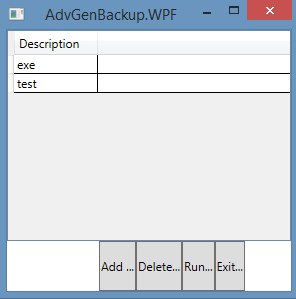
There is no such things for DataGrid.DataBinding() in Datagrid, WPF, the data grid should update itself if any items in the collection is changed. However, I found if the data source is edited by other windows, it won't refresh the data grid.
Well, you can use DataGrid.Items.Refresh(), but sometime, I got an exception about not allow editItem, something like that.
I found the best way is setting the item source to null and set item source to be bounded the collection again, like this:
Code
public void DisplayList(IList< ISchedule> lst) | |
{ | |
lstItems.ItemsSource = null; | |
lstItems.ItemsSource = lst; | |
//lstItems.Items.Refresh(); | |
} |
MenuItem Icon - WPF
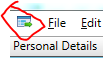
I tried the icon attribute in MenuItem. It doesn't work.Actually, you need to modify the header element like this:
XML
<MenuItem | |
Name="GridButton" Visibility="Collapsed" Click="GridButton_Click"> | |
<MenuItem.Header> | |
<StackPanel> | |
<Image Source="../Images/open.png" Width="16" Height="16"/> | |
</StackPanel> | |
</MenuItem.Header> | |
</MenuItem> |
WPF TextBlock Click Event
Actually, for WPF TextBlock Component, there is no click event. The best replacement is Mouse Down Event,
Like this:
Code
text1.MouseDown += text1_MouseDown; |
WPF Animation
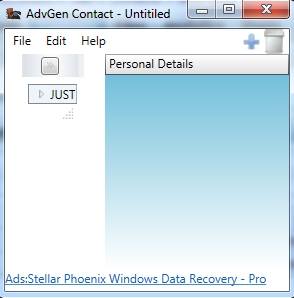
I built a feature to have an animation on the wide of a panel and the user click the minimize button. I wish to create a shrinking effect.
The best way I found is using DoubleAnimationUsingKeyFrames. This kind of animation can targeting any properties which is using a double as its value, such as Wide. Finally, I put the into a storyboard. Like the following
Code
DoubleAnimationUsingKeyFrames da = new DoubleAnimationUsingKeyFrames(); | |
LinearDoubleKeyFrame ad3 = new LinearDoubleKeyFrame(); | |
ad3.KeyTime = KeyTime.FromTimeSpan(new TimeSpan(0, 0, 0)); | |
ad3.Value = ActualWidth; | |
LinearDoubleKeyFrame ad = new LinearDoubleKeyFrame(); | |
ad.KeyTime = KeyTime.FromTimeSpan(new TimeSpan(0,0,6)); | |
ad.Value = 0; | |
Storyboard strbStoryboard = new Storyboard(); | |
strbStoryboard.Children.Add(da); | |
Storyboard.SetTargetProperty(da, new PropertyPath("(FrameworkElement.Width)")); | |
Storyboard.Begin(this); |
The example is from my opensource project, advgen contact manager