 ITBLogs.Info
Category: "Example Codes"
Exploring Ralph Driven Development
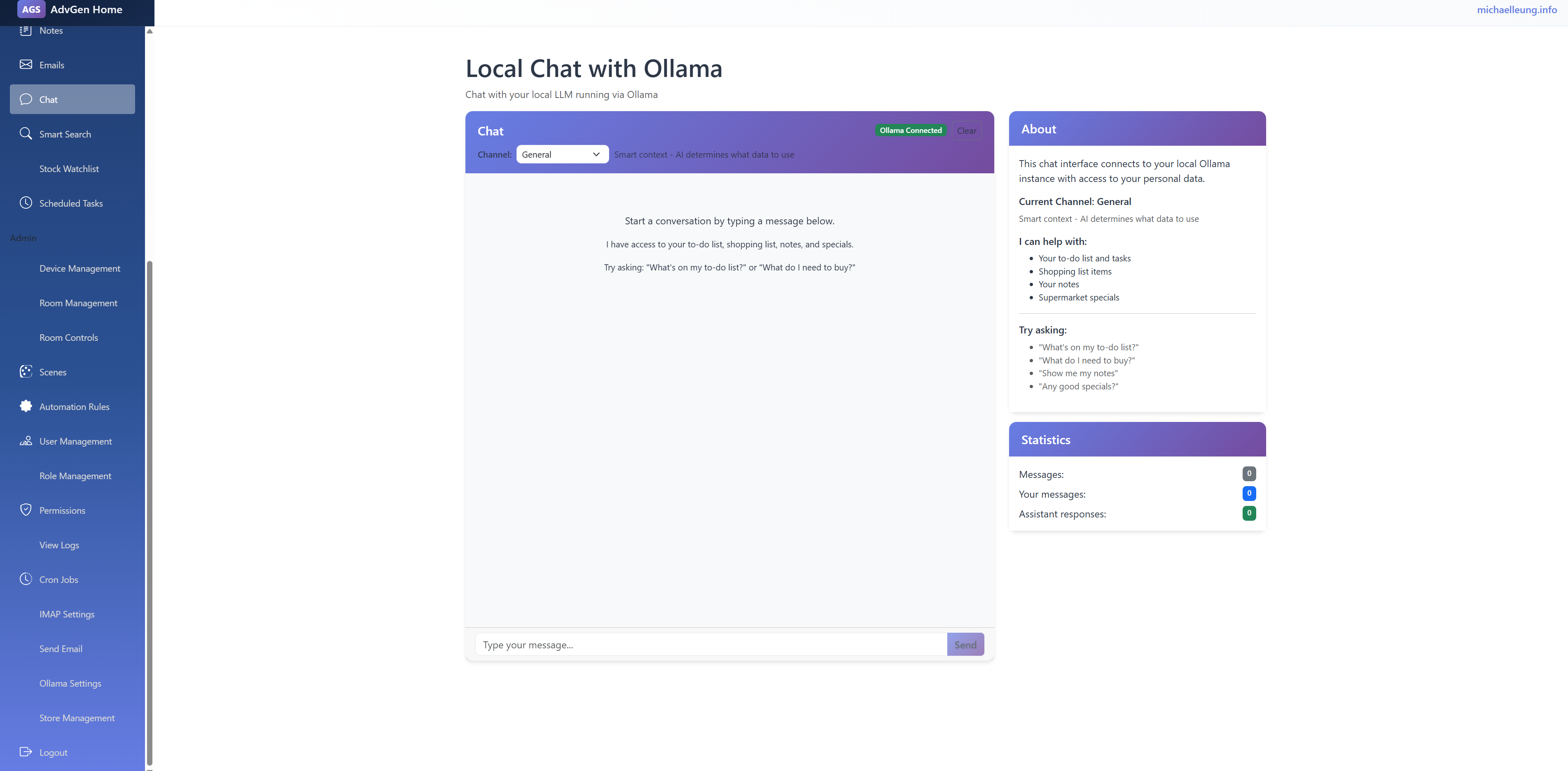
After I read the article from Stop Chatting with AI. Start Loops (Ralph Driven Development) from Luke Parker. I have tried the Ralph Driven Development. That is mind-changing. In the past, I have used AI coding before, which is more like programming by chatting. But Ralph Driven Development is to loop the specification, executing the plan item by item. Then the AI agent will build the application without any human interaction. What I need to do is write the plan in very detailed steps, like “Creating User Management Page with CRUD functions, the edit window needs to be a modal window”. I need to write in very detail, like to teach 3 years old child. At the end, I built my home intranet. It has a to-do list and shopping list management. Moreover, I have hooked up with ollama. I can use the chat to access my to-do and shopping items. Of course, it has a full of bugs. I still need to test and debug (although in the plan, I told it to test it).
Luke used OpenCode. For myself, I used kimi, that is relatively lower cost than Claude Code.
My command is
while ($true) { kimi -p "READ all of plan.md Pick ONE task per timesso Verify via web/code search. Complete task, verify via CLI/Test output. Commit change. ONLY do one task. Update plan.md. If you learn a critical operational detail (e.g. how to build), update AGENTS.md. If all tasks done, sleep 5s and exit. NEVER GIT PUSH. ONLY COMMIT." --yes }
That is working well, but it burned the quote very quick
Best way to download in MAUI
Due to the discontinuation of Google Podcasts, I am writing my own Podcast App for Android. I chose C# MAUI because I am a C# Developer, and I have used Xamarin (become a part of MAUI now) for years.
My first problem is the Podcast App; I need to load the RSS (XML) via HTTP. That is so easy. Same as other C# programs. Also, you can use to load any JSON information in different use case
Code
var client = new HttpClient(); | |
var string1 = client.GetStringAsync("https://podcast.rthk.hk/podcast/novamanage.xml").Result; | |
// deserailize |
Send JSON from AngularJS to ASP.Net Core
I found that is anulgarjs and ASP.net Core are working very well together!
In the client side:
   var Item = {};

Item.Id = 1;

Item.Name = "Test";

        $http.post('/Items/Create', Item);
In the server side controller, then the JSON object can automatic parsed.
You just need to use [FromBody], I found without that, the parameter object will be always null. I think you need to tell the MVC, where is the JSON content:
[HttpPost]
[Authorize]
public async Task
That's easy and clean!
Nest Objects in View Model in ASP.Net MVC Core
I started to use ASP.Net Core in our web development. The first challenge I faced is about the nested View Model.
I have not used much in nested view model in the previous of MVC,
I got the View Models like this:
Code
public Order{ | |
public int Id {get;set;} | |
public Customer Customer {get;set;} | |
} | |
| |
public Customer{ | |
public string FirstName {get;set;} | |
public string LastName {get;set;} | |
} |
If I wish to do the binding in the razor html
You have to add the bind in the controller
Code
public async Task add the binding in the Customer class too | |
|
mc_code_odd">[Bind("FirstName,LastName")]public Customer{public string FirstName {get;set;}public string LastName {get;set;}}
[Example Code]: Simple Validation Framework
Recently, I built a simple validation framework which can work with WPF. I found I can use class attribute and reflection to achieve this purpose.
Firstly, I define a Required Attribute to see whether the property requires a value
Code
[AttributeUsage(AttributeTargets.All)] | |
public class RequiredAttribute : System.Attribute | |
{ | |
public readonly bool Required; | |
| |
public RequiredAttribute(bool required) | |
{ | |
this.Required = required; | |
} | |
| |
} |
Then I add IsValid method in the class, it will use the reflect to get all properties in this class. Then it will check whether the property has "required=true", if that is the case, it will check whether the property has value, if not, it will use an error.
public class PersonModel
	{
		[Required(true)]
		public string Name {get;set;}
		public IList IsValid()
		{
			IList ret = new List();
			foreach (var prop in this.GetType().GetProperties())
			{
				foreach(Attribute attr1 in  prop.GetCustomAttributes(typeof(RequiredAttribute),true)){
					RequiredAttribute attr = (RequiredAttribute) attr1;
					if (attr != null) {
						if (attr.Required)
						{
							if (string.IsNullOrEmpty(Convert.ToString(prop.GetValue(this, null)))) {
								ret.Add(string.Format("{0} is required",prop.Name));
							}

						}
					}
				}

			}
			return ret;
		}
	}
is the best practice. I cannot think another way can do it easier.
Please click here to download the example code.